Build A High-Converting LinkBio Page
How to structure a Blink bio page so visitors reach the right link fast: block order, template choice, and what to A/B test first.
Read articleA link in bio page is one mobile page that sits behind the single link in your social profile and routes visitors to your products, bookings, forms and contact options. Here is how to plan, build a...
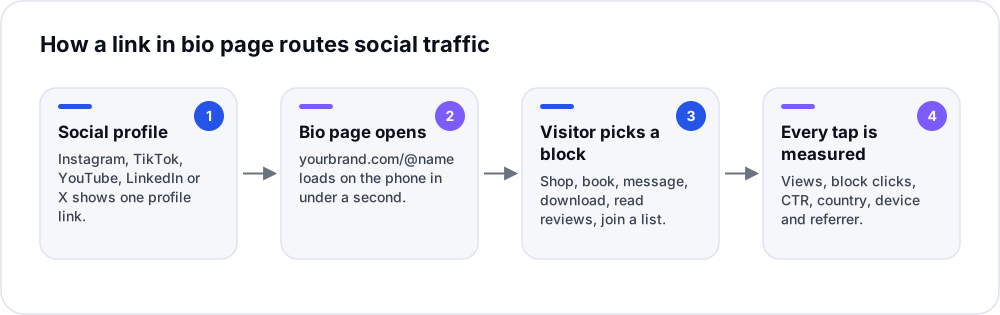
Most social platforms give you one link, or at best a handful, while your business has a shop, a booking calendar, a WhatsApp number, a menu, reviews and a newsletter. A link in bio page closes that gap: it is a single mobile page that sits behind your profile link and sends each visitor to the thing they came for.
A link in bio page is a lightweight landing page, reached from the link in a social media profile, that lists several destinations such as products, booking, contact buttons, videos and forms behind one URL. A good one leads with a single primary action, shows only what visitors need, and measures which block gets tapped.
A link in bio page (also called a bio link, link-in-bio tool or link hub) is a public web page built for phone screens. It usually shows your name, photo and a one-line description, followed by a stack of buttons and content blocks. You paste its URL into the website field of your Instagram, TikTok, YouTube, X, LinkedIn or Pinterest profile, and every visitor who taps that link lands on it.
It is not a replacement for a website. A website explains your whole business; a bio page answers one narrower question for someone who already follows you: “What can I do right now?”
Since 2023, Instagram has let accounts add up to five links to a bio. That helps, but a dedicated bio page still wins for most businesses:
| Need | Native profile links | Bio page in Blink |
|---|---|---|
| Number of destinations | Up to 5 on Instagram; other platforms vary | As many blocks as the page needs |
| Rich content (products, menu, video, FAQ) | No, text links only | Yes, 13 block types |
| Same page on every platform | No, you edit each profile separately | Yes, one URL for all profiles and QR codes |
| Click analytics per link | Limited, and inside each app | Block-level clicks, CTR, device, country, referrer |
| A/B test the order or wording | No | Yes, Link Bio A/B testing |
| Your own domain | No | Yes, with custom domains |
| Capture leads on the page | No | Yes, lead form block |
If you only ever need to send people to one website, a plain link is enough and a bio page is extra overhead. Once you have two or more goals, such as sales plus bookings or content plus a newsletter, the page pays for itself.
Start from the three to five things your followers ask for most often in comments and DMs. Those questions are your blocks. Blink’s bio page builder has 13 block types, and each one maps to a common visitor need:
| Block | Use it for | Good example |
|---|---|---|
| Header | Section titles that group blocks | “Shop”, “Book”, “Learn” |
| Link | Any destination URL | Latest YouTube video, blog post, store |
| Product | Items with an image and price or availability | Best-selling product or course |
| Lead Form | Collecting names, emails or phone numbers | Free guide, waitlist, quote request |
| Contact | Call, email, WhatsApp and similar actions | “Chat on WhatsApp” for orders |
| Menu | Items and prices shown on the page | Café menu, salon price list |
| Review | Sending visitors to Google, Trustpilot or your review page | “Leave a review” after a visit |
| Video | An embedded video | Product demo, trailer |
| Gallery | Several images in one block | Portfolio, before/after |
| File | Downloads | Price list PDF, media kit |
| FAQ | Answers to repeated questions | Shipping times, opening hours |
| Embed | Third-party widgets | Calendar, music player |
| Social | Icons for your other profiles | Instagram, TikTok, YouTube, LinkedIn |
Most bio pages fail because nothing on them stands out. Use this order as a default and adjust once you have click data:
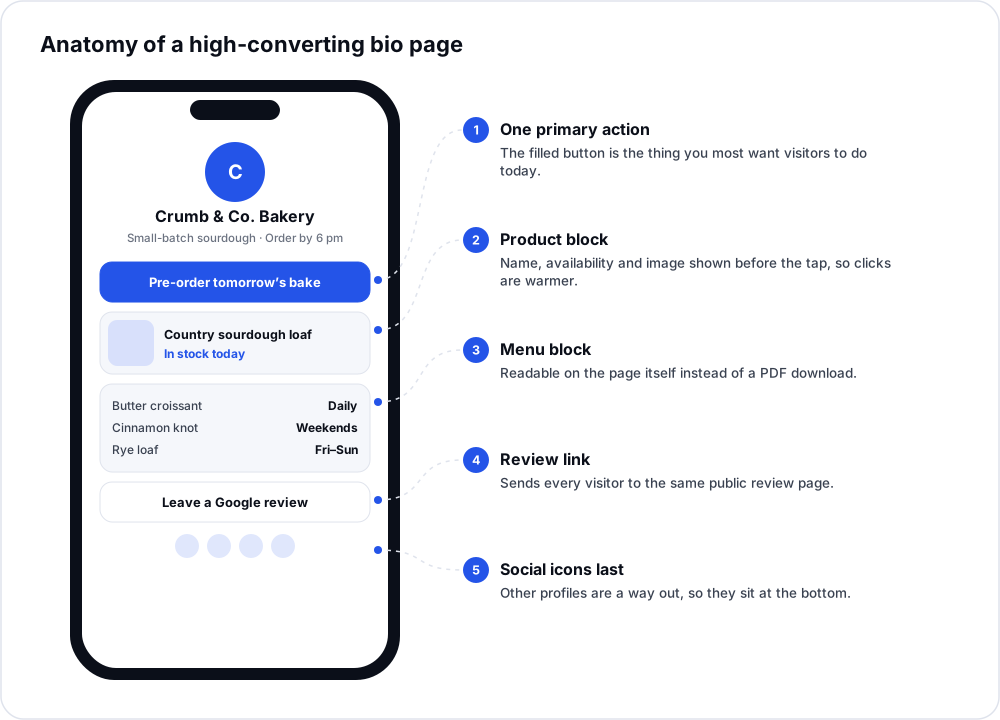
Here is an illustrative example of a common restructure. A neighbourhood bakery’s first page had eleven equal buttons: website, menu PDF, Instagram, Facebook, Google Maps, Zomato, Swiggy, WhatsApp, careers, catering and a blog.
The rebuilt page used five blocks: a filled “Pre-order tomorrow’s bake” button (Contact block to WhatsApp), a Product block for the bestseller, a Menu block replacing the PDF, a Review block, and social icons at the bottom. Careers and catering moved into an FAQ block.
What to watch after a change like this: block-level CTR on the primary button, and how many taps now go to the PDF-style links that used to be a dead end on mobile. With block-level analytics you see this per block within days instead of guessing.
| Metric | What it tells you | What to do with it |
|---|---|---|
| Page views | How many people reached the page | Judge your social reach and profile CTA, not the page itself |
| Block clicks | What visitors actually want | Move high-click blocks up and remove blocks nobody taps |
| CTR (clicks ÷ views) | How well the page routes traffic | A falling CTR usually means the top block no longer matches what you promote in posts |
| Referrer | Which platform sent the visit | Tailor the first block to the platform that sends the most traffic |
| Country and city | Where visitors are | Show local offers or shipping details that fit |
| Device | iPhone vs Android vs desktop | Check that app links and downloads work on the main device |
A bio page gathers traffic in one place; it does not create it. If your content is not bringing people to your profile, a better page will not fix that. The page also only works as well as the pages it links to: a button promising “same-day delivery” that opens a slow checkout will lose the visitor either way.
A bio page can be indexed, but it is not an SEO tool. Its job is converting social traffic. Put your long-form, keyword-rich content on your website and link to it from the bio page.
Yes. In Blink you connect a domain or subdomain once, and bio pages and short links can resolve under it, for example links.yourbrand.com/shop.
Usually 4–7 blocks. Enough to cover your main visitor goals, few enough that the primary action stays obvious.
Yes. Blink supports multiple bio pages per account (the number depends on your plan), which is useful for separate brands, locations or client accounts.
Yes. The Bio QR & Share kit creates a branded QR code for each bio page, so flyers, packaging and shop counters send people to the same page as your social profiles, and scans show up in the same analytics.
How to structure a Blink bio page so visitors reach the right link fast: block order, template choice, and what to A/B test first.
Read articleHow to run QR codes on packaging, menus, and flyers without locking in a destination before print — using dynamic QR and bulk g...
Read articleWhy branded short links outperform generic redirect domains for trust and analytics, and how to set one up with a custom domain.
Read articleWe use cookies to improve your experience, measure traffic, and support analytics features. Read our cookie policy